
BeaterCore Mods and the Map Editor
Official manager, workshop boxes, and a hub button that opens a creation menu.
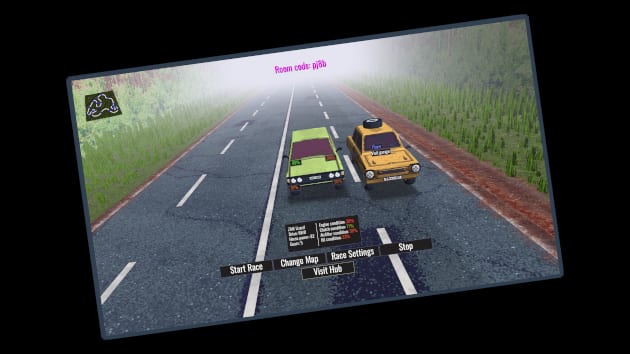
BeaterCore grew a real mod pipeline before the 9 September 2026 Steam launch. Version 0.3.0 added official, basic mod support, a manager in the settings menu, and multiplayer servers that check compatibility. The Steam product lists Steam Workshop and a level editor. Demo builds did not use Workshop; early maps lived in the community Discord. This page is the hygiene guide, not a piracy list.
If you only want official tracks, you can ignore mods forever. If you join a Friday lobby, you cannot.
The 0.3.0 manager
Open settings. The mod manager is there. Enable what the session needs. Disable what it does not. Servers check compatibility and can automatically enable required mods and disable packs that are missing or unwanted on that server. That sentence is the whole multiplayer rule. You are not clever for sneaking a client-only pack into a vanilla host.
Agree on a list in chat before the first grid. Then launch. If someone cannot load, they are not “bad at racing.” They failed the check. Send them this page and multiplayer.
Workshop versus Discord
Steam Workshop is listed on the full game. Use it when the item exists there. Early demo distribution used Discord because Workshop was not on the demo. Both can still appear in conversation. Prefer Workshop for anything you want to keep across reinstalls. Keep Discord for WIP that has not been uploaded yet. Official links sit on the links hub.
Do not install random executables because a stranger in a lobby named them “beatercore_pack_final.” The manager exists so packs stay in-game.
Editor brushes and the hub button
The in-game editor gained, in 0.3.0:
- Draw brushes that can be rotated.
- Clickable icons for draw modes.
- Brush intensity independent from brush size.
- A map editor button on the hub with a map creation menu.
That is enough to sculpt a dirty loop and hurt your friends. It is also enough to blow past system requirements. Vanilla dirt is the GT640-class promise. A custom 1 km sculpt with extra props is a different GPU bill. Test one circuit solo before you host contact events on it.
Treat unknown custom surfaces as dirt-plus-holes until you learn them. Pack a roof spare. Tuning still applies when the terrain is community-made.
Replays broke on purpose
0.3.0 changed the replay file format. Old demo replays may not open. The patch also made failed replays stop crashing the game. Record new clips after launch. Do not promise a lobby a highlight reel from February.
A creator checklist
- Build in the editor with intensity separate from size so details are not giant smears.
- Play your own three-heat event on it. If you cannot field repair without falling through the world, do not publish.
- State required mods in the Workshop description.
- State season intent (ice, dirt, mixed) so people bring tires.
- Keep official career saves off experimental maps until you trust the collision.
A player checklist
- Subscribe or enable only what the host named.
- Let the server check run.
- Confirm the spare is on the roof. Custom ruts eat rubber.
- Drop render scale if the sculpt is heavier than vanilla.
- Leave if the pack is a mystery executable.
Mods are why a small racing game can live after launch week. They are also why a small racing game can fail to start. Use the manager, use Workshop when it is there, and keep career on official dirt until the custom loop survives heat three. When a new editor tool ships, it will land in patch notes — read those before you assume a brush still works the old way.
Frequently Asked Questions
Quick answers to the most common BeaterCore questions.
Does the Steam release support Workshop?
The Steam product lists Workshop and a level editor. Demo builds used Discord plus the 0.3.0 in-game manager. Prefer Workshop when the item exists there.
Why did the lobby disable my mods?
Servers check compatibility and enable required packs while disabling extras. Match the host list — see multiplayer.
Where is the map editor?
A map editor button on the hub opens a creation menu. 0.3.0 added rotatable brushes, draw-mode icons, and independent intensity.
My old replays will not open.
0.3.0 changed the replay format. Record new ones. Failed replays should no longer crash the game.